| Model & capacity | Fit & specifications | US offer |
|---|---|---|

Toshiba MG07MG07ACA14TE
|
Bulk storage candidate. Check sector format, cooling and the warranty provider. Used / renewed: check seller warranty and returns. |
$354.00$25.29/TBView on Amazon ↗ — MG07ACA14TE, usedChecked Oct 27, 2026 13:35 UTC |
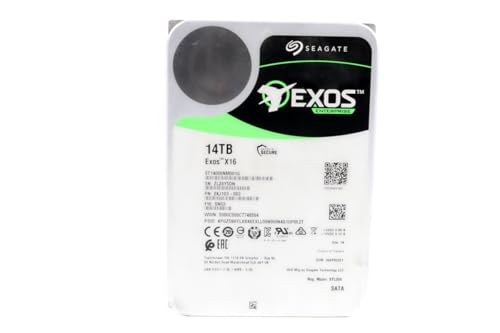
Seagate Exos X16ST14000NM001G
|
Bulk storage candidate. Check sector format, cooling and the warranty provider. Used / renewed: check seller warranty and returns. |
$409.99$29.29/TBView on Amazon ↗ — ST14000NM001G, usedChecked Oct 27, 2026 12:21 UTC |

Western Digital Ultrastar DC HC550WUH721816ALE6L4
|
Bulk storage candidate. Check sector format, cooling and the warranty provider. Used / renewed: check seller warranty and returns. |
$459.99$28.75/TBView on Amazon ↗ — WUH721816ALE6L4, usedChecked Oct 27, 2026 05:19 UTC |

Seagate Exos X18ST18000NM000J
|
Bulk storage candidate. Check sector format, cooling and the warranty provider. Used / renewed: check seller warranty and returns. |
$549.99$30.55/TBView on Amazon ↗ — ST18000NM000J, usedChecked Oct 27, 2026 12:21 UTC |
Specifications: linked manufacturer model pages. Selection covers different capacities and families; it is not a reliability ranking. Prices are per listed drive; Amazon’s price and availability at purchase apply.
Is this the right kind of drive for your build?
Consider this model when you want a high-capacity internal SATA hard drive and are comfortable assessing a renewed offer. It is a bare drive, so your computer, NAS or enclosure must supply compatible connections, power and mounting space. Compare the total cost of a suitable renewed offer with a new drive before deciding. A lower purchase price is useful only if you accept the seller's return and warranty terms. This is a specification-based buying guide, not a hands-on reliability test or an endorsement of a particular seller.
Check the full model number: ACA and SCA are different
Toshiba documents MG07ACA14TE as a 14TB, 3.5-inch, 7,200 RPM SATA model with 512e sectors. The MG07 family also includes SAS models. Do not buy from a title that merely says Toshiba MG07 14TB: confirm the complete model number and interface on the offer. A drive bay fitting a 3.5-inch disk does not by itself establish interface compatibility. The manufacturer's specifications below describe the original model, not the condition of a particular renewed unit.
Evaluate the offer separately from the hardware
Before ordering, check who sells the drive, the stated condition, what is included, the return deadline and who handles a warranty claim. Keep the order details and the terms you relied on. Do not assume that a warranty advertised for a new Toshiba drive transfers to a renewed or previously deployed unit. If a listing promises testing, ask what was tested and whether the results apply to the individual drive you will receive. A familiar model number cannot establish that unit's remaining service life.
For a NAS, check the enclosure as well as the drive
Check your NAS manufacturer's compatibility documentation for your exact enclosure and software version. Confirm supported interfaces and drive capacities. Also consider where the NAS will sit, its cooling and your tolerance for drive noise; this guide does not include acoustic testing. If replacing a member of an existing array, follow that platform's replacement procedure and capacity requirements. Keep a separate backup: redundancy does not protect against every way data can be lost.
Compare equivalent offers, not just the lowest sticker price
Compare this 14TB SATA offer with other SATA drives of similar capacity and condition. Separate new and renewed offers, and account for shipping, taxes, warranty and returns. For a single 14TB drive, divide the total drive price by 14 to calculate cost per decimal TB. For example, a hypothetical $280 offer costs $20 per TB before additional charges. This example is not a current price. Check Amazon for the current offer; prices, sellers and availability can change.
Leave time to check the drive during the return window
Before storing important data, compare the label with the model you ordered and inspect the packaging and drive for damage. Follow your NAS or diagnostic software's supported procedure to read drive-health information and test the disk. Use a new, empty disk for any test that writes across its contents. Keep the test results and contact the seller promptly if the drive fails a check. Passing diagnostics is useful evidence about its current state, not a promise about future reliability.
Quick Decision Guide
| Specification | MG07ACA14TE |
|---|---|
| Nominal capacity | 14 TB (decimal) |
| Interface | SATA 6 Gbit/s |
| Form factor | 3.5-inch |
| Rotation speed | 7,200 RPM |
| Sector format | 512e |
| Recording | Helium CMR |
Frequently Asked Questions
Is MG07ACA14TE a SATA or SAS drive?
Does renewed mean a new manufacturer warranty?
Is this a review based on long-term testing?
Sources
Ready to find the best deal?
Check the current US offer, seller, condition and return terms on Amazon.